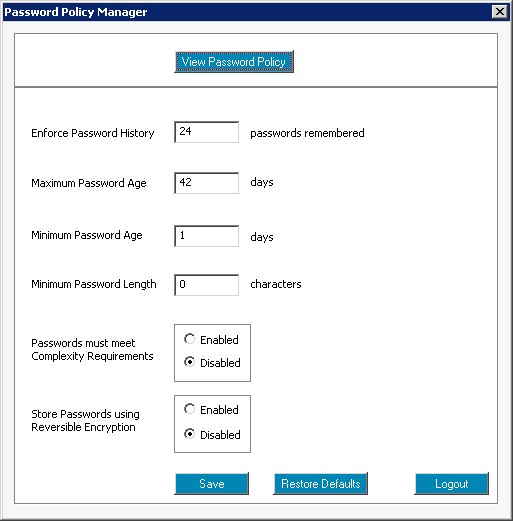
Password Policy Manager is a free tool from ManageEngine ADManager Plus that allows any user to retrieve and view the Domain Password Policy. This tool also allows users with administrative rights to edit the Domain Password policy.
Password Policy fields that can be edited using this tool include:
- Password History — Number of Passwords that the system must remember
- Minimum and Maximum Password Age
- Minimum Password Length
- Password Complexity and
- Storage of Password Using Reversible encryption
How to use this Password Policy Manager?
- Launch the “ADManager Plus Free Tool” by clicking on the desktop icon and click on the “Password Policy Manager” link to access this utility.
- It automatically detects the Domain it is installed on and allows you to view or edit its Password Policy.
- To View / modify Password Policy of other Domains in the network – Enter the Domain name and its corresponding credentials in the tool. (Only users with admin credentials of a Domain can edit its Password Policy)
- In the text boxes provided enter the Domain and necessary credentials.
- Click “View Password Policy” to view the password policy of the domain.
- To edit the password policy, enter the required values and click the “Save” button.
- Click “Restore Defaults” button to choose default password policy. Click “Save” to save the changes.
NOTE: Only administrators or users with administrative rights can change a password policy. Others can only view the policy.
Why should one consider this Password Policy Management tool?
- It allows any domain user to view the password policy of his Domain so that he can reset his password accordingly.
- It allows the administrator to edit the password policy set for any Domain in the network.
- The Windows Active Directory Free Tool can be installed on any machine in the Domain. Any change made through this tool is updated in the Active Directory of corresponding domains.







