

The ideal password is over 14 characters long, with a mixture of upper and lower case letters, numbers, and special characters. But many users are allowed to use weak passwords based on the weak password policy. The IT admin’s job is to ensure that every user account in Active Directory is secured with a strong password. Unfortunately, the default domain password policy, which admins use to enforce password rules in Active Directory, is usually not configured to force good passwords, and in many cases does not even provide the needed controls to strong passwords.
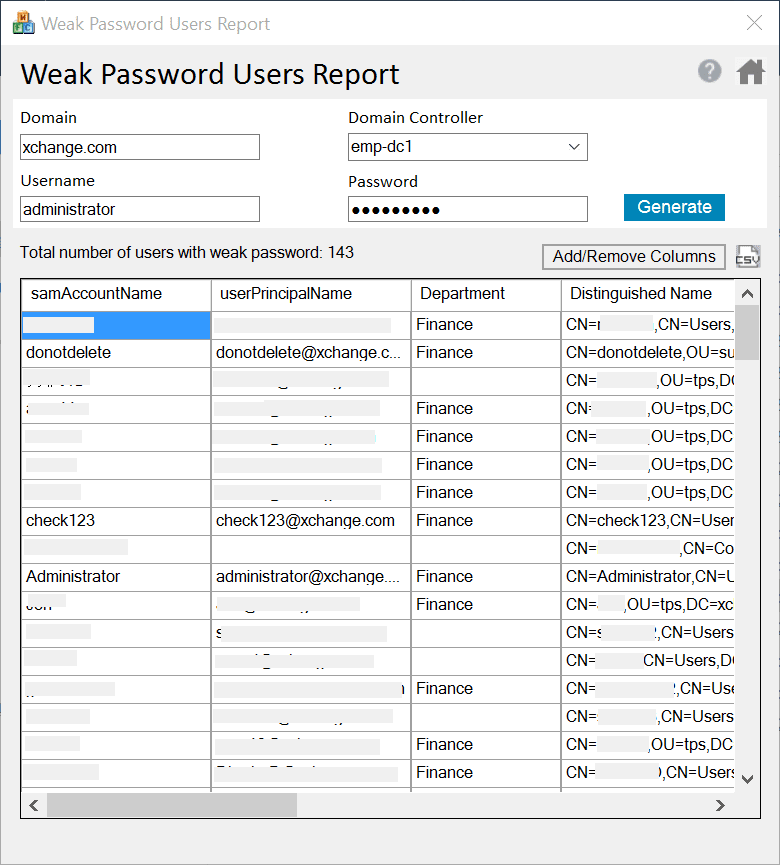
The Weak Password Users Report helps you find weak passwords in Active Directory by comparing users’ passwords against a list of over 100,000 commonly used weak passwords. When it finds a match, the report will display the users’ details. You can then force the users with weak passwords to change their passwords the next time they log on, or use a password management solution—such as ADSelfService Plus—to granularly enforce a much stronger password policy.
How to check for weak passwords in Active Directory using the Weak Password Users Report

- Open the ADManager Plus Free Tools application.
- Under the AD User Reports section, click Weak Password Reports.
- Enter the Domain DNS name and the Domain Controller name.
- Type the username and password of an account with necessary permissions.
- Click Generate. A list of users with weak passwords will be displayed.
- Export the list to a CSV file, if needed.
Highlights
- Secure your Active Directory domain by eliminating weak passwords.
- Analyze the password strength of any user in the domain.
- Re-run the report periodically to confirm stronger passwords have been implemented.
- Export the list of users with weak passwords to a CSV file.
- Add your own list of weak passwords to the built-in list of weak passwords.
- Use the GUI-based tool instead of writing and maintaining complex PowerShell scripts.
- Keep costs down with this license and restriction-free complimentary tool.