

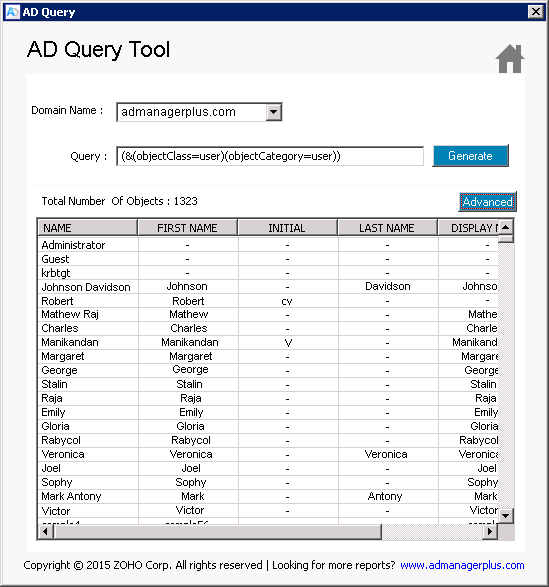
AD Query Tool is a convenient utility from ManageEngine ADManager Plus which allows users to query the Microsoft Active Directory from a convenient user interface. Any desired data on specific Active Directory objects can be obtained by supplying LDAP Queries in this utility.
The AD Query tool is simple and easy to use. It allows you to get any attribute data that you require from the Active Directory like a User objects’ first name, last name telephone, address an so on. This scripting utility also helps you to query Active Directory Group and Computer objects – all on a convenient interface and a single view.
Pre-requisites to using this tool:
- This tool requires the user to be equipped with basic LDAP scripting knowledge.
- The tool must be able to connect to the Domain on which LDAP query is used.
How to use this AD Query Tool:
- Click the “AD Query Tool” from the Launcher to start the tool.
- Specify Domain Name in the text field.
- Specify the Active Directory query in the Query text area.
- Click on the GENERATE button to get the corresponding attribute values.

Why should one consider this AD Query tool?
- It allows you to search for Domain Users and Domain objects.
- It allows you to query the Active Directory and view Object schema and LDAP data in one single window.
- It provides an easy view of Email data of users in the domain.
- It is easy to install, get started and experiment with any query in your AD.
- It allows you to also query the AD for Group and Computer object details.
- It comes packaged along with several other useful Active Directory utilities.
- Select and view only the columns or AD attributes that you would like for any generic LDAP Query.
- Simple and Convenient. Saves time and is also 100% free.
Note: The “Advanced” button will help you generate more attribute results for the Domain in accordance with the user’s query.